Prerequisites
Before adding the pipeline, set the required credentials as GitLab CI/CD variables. In your GitLab project, go to Settings > CI/CD > Variables and add:CHECKLY_API_KEY: a Checkly API key, created on the API keys tab in your Checkly user settings. Mark this variable as Masked so it does not appear in job logs.CHECKLY_ACCOUNT_ID: your Checkly account ID, found on the Account settings tab.
variables block in the pipeline example below references these CI/CD variables and exports them to the checkly test and checkly deploy commands.
A Basic GitLab Pipeline Example
Create a new.gitlab-ci.yml file in your repo, or add the steps and stages from the example below to your existing file.
This pipeline is “branch aware” and treats the main branch as the production branch. This means checks are only deployed
to Checkly after they are ran against production (after merging to main) and the checks passed.
.gitlab-ci.yml
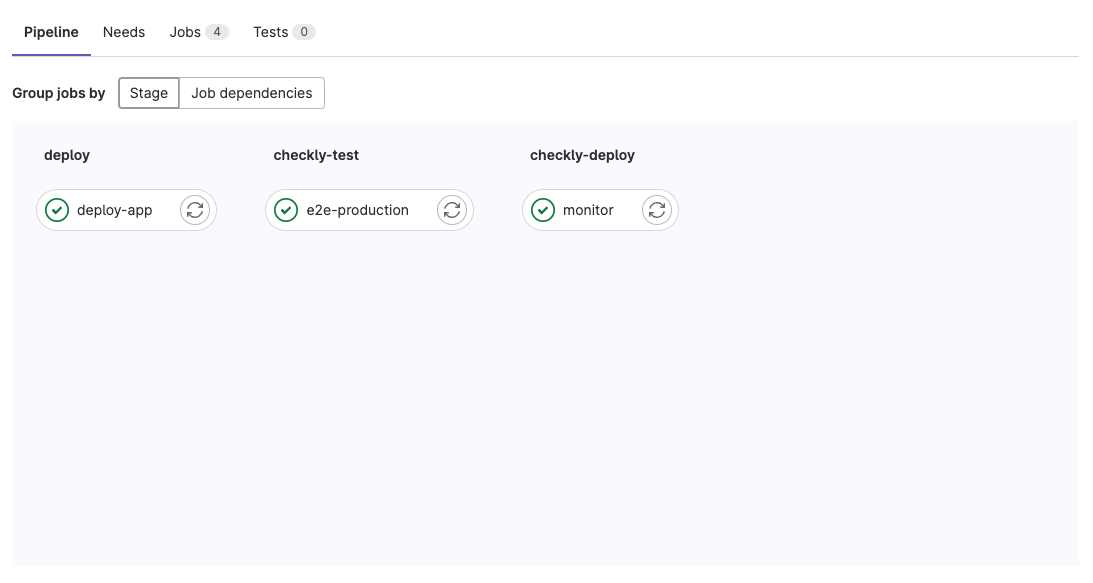
- deploy: this is where your application specific deployment logic happens
- checkly-test: after the deploy stage, we run the
checkly testcommand. We run two different jobs based on whether we are on themainbranch of a different, feature branch so we can set a different environment. - checkly-deploy: the last stage, that only runs on
mainis to deploy the checks to Checkly. Note that this stage only runs when the previouse2e-productionjob is successful.